Showing posts with label Painting Tutorials. Show all posts

Saturday, June 11, 2022

Painting & Basing Methods Tutorial


Newly painted third battalion of the Prussian Guards, wearing mitre hats.
The second battalion wore tricorn hats.


CLICK OR DOUBLE CLICK ON ALL PICTURES TO ENLARGE


Yesterday I finished painting a 42-figure unit of the 15/III third battalion of the Prussian Guards for my Seven Years War army. The unit had been sitting on the painting table for several months now and I just couldn't find the gumption to finish them off. So I decided that enough was enough and it was time to finally get them finished and on the game table. 


Front view of the Guards unit.


Rear view of the Guards. The officers and NCOs form a third rank to the line.

I had previously painted the second battalion of the Guards - they wore tricorn hats whilst the third battalion wore grenadier miters. The first battalion was the ceremonial guard unit that only saw action at the Battle of Kolin during the Seven Years War. The second and third battalions saw a lot of action over the course of the war. All of the figures, both second and third battalions, are Minden Miniatures figures that are specifically sculpted to the uniform details of the guards battalions.

I really had to power through the project at first, but eventually momentum kicked in and I started to make progress on the final 20 figures that I needed. The early stages of my painting method gets very tedious, especially when it comes around to painting all of the black bits on the figure. Here is step by step list of how I paint my figures:

1. prime the figures with a light grey color of spray primer. The Vallejo "Wolf Grey" is my favorite.

2. paint the skin areas an undercoating of red brown

3. paint the uniform coat a dark navy blue

4. paint the small clothes next (waistcoat and breeches) a dark yellow

5. paint the red facings (cuffs, lapels, turnbacks and collars)

Now comes the hard part, painting the equipment a black undercoat

6. paint black to all of the equipment such as cross belts, bread bags, knap sacks, water bottles, muskets, scabbards, gaitors, and headgear. This stage takes about 5 minutes per figure, but it becomes extremely tedious after the first couple of figures. I use black as an undercoat for anything that I paint brown or white.

At this point, most of the major colors are "blocked in" and cover the entire figure with various paint colors. Now I advance to applying highlights and details such as buttons and facial features .

7. paint a tan skin or ruddy flesh color over the red brown skin areas, leaving the red brown undercoat showing in the eye sockets and mustache.

8. paint the knapsack and musket dark brown.

9. block in the cross belts and bread bag with a light grey color

10. apply highlight colors on the blue coat, red facings and yellow small clothes.

11. apply white to the cross belts and bread bag.

12. paint the mitre plate on the grenadier mitre silver, paint the cartridge box emblem silver and paint the buttons and lace silver. Anything that has a metallic color must always have a black undercoat in order to make the metallic color be noticeable and have a "pop".

13. paint the musket barrel and water bottle a pewter color. I really do not like painting musket barrels and bayonets for some reason, so this stage is rather tedious for me.

14. paint the buckles, musket butt, sword hilts and scabbard tips Old Gold or brass.

15. (optional) paint all of the leg gaitor buttons with the Old Gold color. Again, this is a tedious step.

16. Add a skin color highlight, touching a small dot on the chin, bridge of the nose and cheeks. Hands get two stripes of highlight on the broad part of the hand. I generally do not paint knuckles. That is borderline ridiculous. 

17. (optional) add another highlight red color. This is generally not necessary but it sometimes provides a color "pop" to the lapels.

18. paint the base dark green

The figure is finished at this point. Note that I do not paint eyes anymore, other than to put a black dot in the eye socket sometimes, nor do I highlight anything that I've painted black. I mean, black is black and it doesn't really lend itself to highlighting. My one exception to the "no black highlighting" rule is horse manes/tails and black horses. I mix a bit of flesh color to a basic black which produces a very dark grey color, which I use sparingly.

And that's how I paint my wargame figures. Once I have passed Step 12 then things seem to speed up and the feeling of tedium passes. I like painting the details on my figures because these seem to bring the figures alive.

Once all of the painting is completed then I move on to basing the figures. I use either MDF bases or buy thin plywood bases from Litko Bases. I glue the figures to the wood using white "Elmer's Glue" and let the glue dry overnight.

Next, I trowel in the "mud", which is a goop made of premixed wallboard paste (get the light paste and not the heavy paste - you can tell the difference just by picking up the quart container by hand). I like the Red Devil Pre-mixed Spackle Compound brand the best. I stir in a dark brown acrylic paint to the Spackle and stir it up until all of the white Spackle color is gone, with the final mix looking like chocolate pudding (but don't eat it!). I use a tiny artists' palette knife or scalpel to trowel the goop between the figures. Sometimes a toothpick or an old paint brush are used to get the goop between the feet of the figures.

While the goop is still wet, I dunk the base into a tray of extra fine railroad ballast made by Woodland Scenics. Then I let the base dry over night.

The next day I stir up some highlight colors and dry brush the paint over the bases. I might use two or three different highlight colors until I get something that looks right to my eye.

Now comes the foliage. I glue on pieces of tufts, which are long clumps of grass. Army Painter makes a nice variety of tuft colors. I use Swamp Grass tufts for the most part. I let the white glue dry for about an hour and then add static grass to the base. Let the tufts dry before you glue on the static grass, otherwise some of the static grass will adhere to the glue on the tufts and, well you won't like how that looks so it's better to let the tufts dry for a short while. You can also add flowers tufts and bits of ground clutter at this stage, if you like.

Now I paint white glue randomly on the base of the figures and dip the base into a tray of static grass, or I sprinkle the static grass onto the base. Then I turn the base sideways and tap the back of the base to remove excess static grass. Then I blow on the top of the base to make the static grass stand up.

The bases are now finished and the final step is to give everything a spritz spray of matte finish (Dull Kote or similar brands). Actually, oftentimes I spray the figures before I start adding the goop to the bases. One note of caution - if you are using GMB Designs flags or similar brands of pre-printed flags, I'd recommend spraying the flag bearer(s) separately, then all of the other figures get sprayed, and then you glue your flags to the flag poles. Then you glue the figures to the bases and then trowel on the goop. Some people like to spray the matte finish to the grassed bases but I don't find this to be a necessary step. Do be careful though to NOT SPRAY YOUR FLAGS with matte or gloss spray because the sprays make the ink colors run.


With the completion of the third battalion of the guards I now have seven units for my War of Austrian Succession Prussian army consisting of the following units:

IR1 Winterfeldt musketeers - 2 battalions

IR18 Prinz von Preussen musketeers - 2 battalions

IR15/II second battalion of the Guards - 1 battalion

IR15/III third battalion of the Guards - 1 battalion

Bornstadt Grenadier Battalion (5/20) - battalion

Plus the 36-figure Bayreuth Dragoons in white coats cavalry regiment.


Next on the painting table: Austrian Grenadier Battalion with 32 to 36 figures.

Tuesday, March 15, 2022

Painting Tutorial: Numidian Light Cavalry In Hannibal's Army


Click on all pictures to enlarge the view


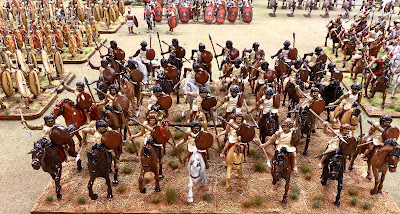
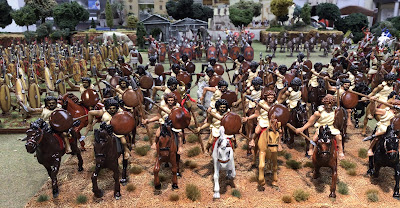
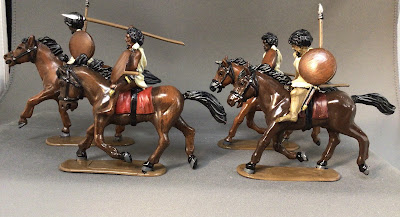
Yesterday I spent a good part of the day basing cavalry figures for my 54mm Punic Wars Project. I have shown pictures of the Numidian light cavalry in previous blog posts, however, I hadn't gotten around to basing the figures.

Unlike my Italian cavalry, I opted to not use green static grass on the bases. I wanted to achieve a more arid look to the bases so I relied on lots of dry brushing of light colored paint. Then I selected an assortment of dark tufts to provide some contrast to the base. The finished bases remind me a little bit of Western tumbleweed. I am happy with the look of the bases.


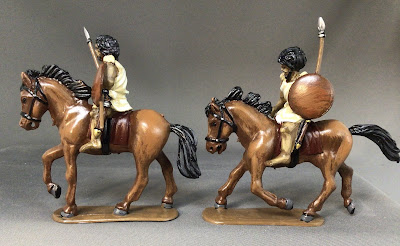
HaT Industrie Numidian light cavalry figures.


So now I have 32 Numidians that I painted and 16 more that I acquired from a collector who decided to dispose of his collection (much to my benefit). Thus there is a total of 48 Numidian light cavalry. I might paint another 16 figure unit in the future as I move into Stage Two of my Punic Wars Project.


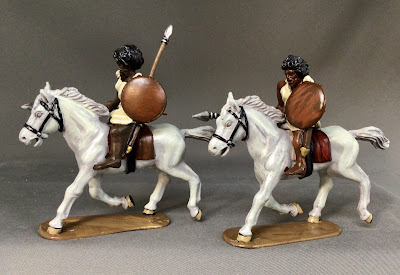
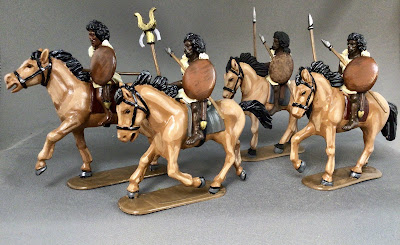
Here are some close up pictures of some of the Numidians prior to getting based. I posted these pictures to give you an idea of the various horse colors that I painted.


1) Reaper  Ruddy Leather (09109) shade or base color.  Reaper  Oiled Leather (09110) highlight.

I used the Reaper Olive Skin triad paints for the skin color on the riders.


2) Iron Wind Metals Grey (77-707) shade or base. P3 Sickly Skin (93132) highlight.

I used the Reaper Dark Skin triad for the skin color on the riders.


3) P3 Umber base/shade (93028) and P3 Bloodstone (93029) highlight. The figure below on the far right, front row is done only in the P3 Umber color and a high gloss finish. Most of my darker horses have black manes and tails.


4) This is a color scheme that I made up. I don't know if horses exist with the colors below, but they look nice for light cavalry horses.

Reaper Oiled Leather shade or base color (09110). The I mix my own highlight color using the Oiled Leather plus some Reaper Creamy Ivory (09144) for the highlight color. I can't really give you a formula for this because I mix the paint until I get a highlight color that looks right to my eye. It doesn't take much more than a drop of the Creamy Ivory color mixed in with a lot of Oiled Leather. My recollection is that I do make a "base color" that is a little bit lighter than the Oiled Leather. Then I follow that up with a "highlight color" that has even more Creamy Ivory mixed into the Oiled Leather.

The figures are finished off with black manes and tails and hooves painted with a dark grey craft paint color. The bases are finished with a brown color, but this doesn't matter because the horse bases will get covered over with my terraining goop.


African Skin Color

This is a hard one for me because I can't seem to get a natural looking skin color for the Numidians, Beja and Dervish warriors. I assume that Numidians have a variety of skin tones so they should not all look the same. I have no idea what an ancient era Numidian looks like so I have come up with some different ideas for the skin tones.

My advice is to use a triad color system with the shade, base and highlight colors already selected for you. I use the Reaper Dark Skin triad: Dark Shadow (09040), Dark Skin (09041), and Dark Skin Highlight (09042). I use just the shadow and the highlight colors and skip the base color so that I get more of a contrast on the figure's skin.

Another formula is to use the Reaper Dark Skin Shadow (09040) and then use some P3 Bloodstone (93029) as a highlight.

The Reaper Olive Skin triad provides more variety to my Numidians for a lighter color variant. I also use this color for some of my Carthaginian Liby-Phoenician peoples.

Sometimes I slip in several figures with tan skin from the Reaper Tan Skin triad. Tan Shadow (09043), Tan Skin (09044) and Tan Highlight (09044). This is the color that I use for all of my Caucasian skin peoples such as Romans, Celts, Hibernians and some Carthaginians.

Hair Color

I use black for the Numidian figures and for any figure that uses the Olive Skin triad. My Romans and other caucasian peoples general get brown paint. 

Gloss Finish Effects

One of the nice things about a gloss finish is that it does a good job of hiding most painting mistakes and it makes certain colors "pop". The darker skin colors look better with gloss, which naturally provides a highlight to the skin tone.  

A gloss finish also makes it easy to mass produce horses. I paint the horse either black or umber and then give it a spray of gloss. Think William Britain's 54mm metal toy soldiers for how the glossy horses look. The end result looks good and you didn't have to spend extra time working with triads.

Gloss coating also seems to provide a heavier protective coating than Dull Coat or other matte finishes. I use gloss spray coating for all of my plastic figures, but matte finish for my metal figures.

Sunday, January 12, 2020

Return of the Painting Mojo & A Painting Tutorial


Prussian Guard IR15/II battalion.
Minden Miniatures.


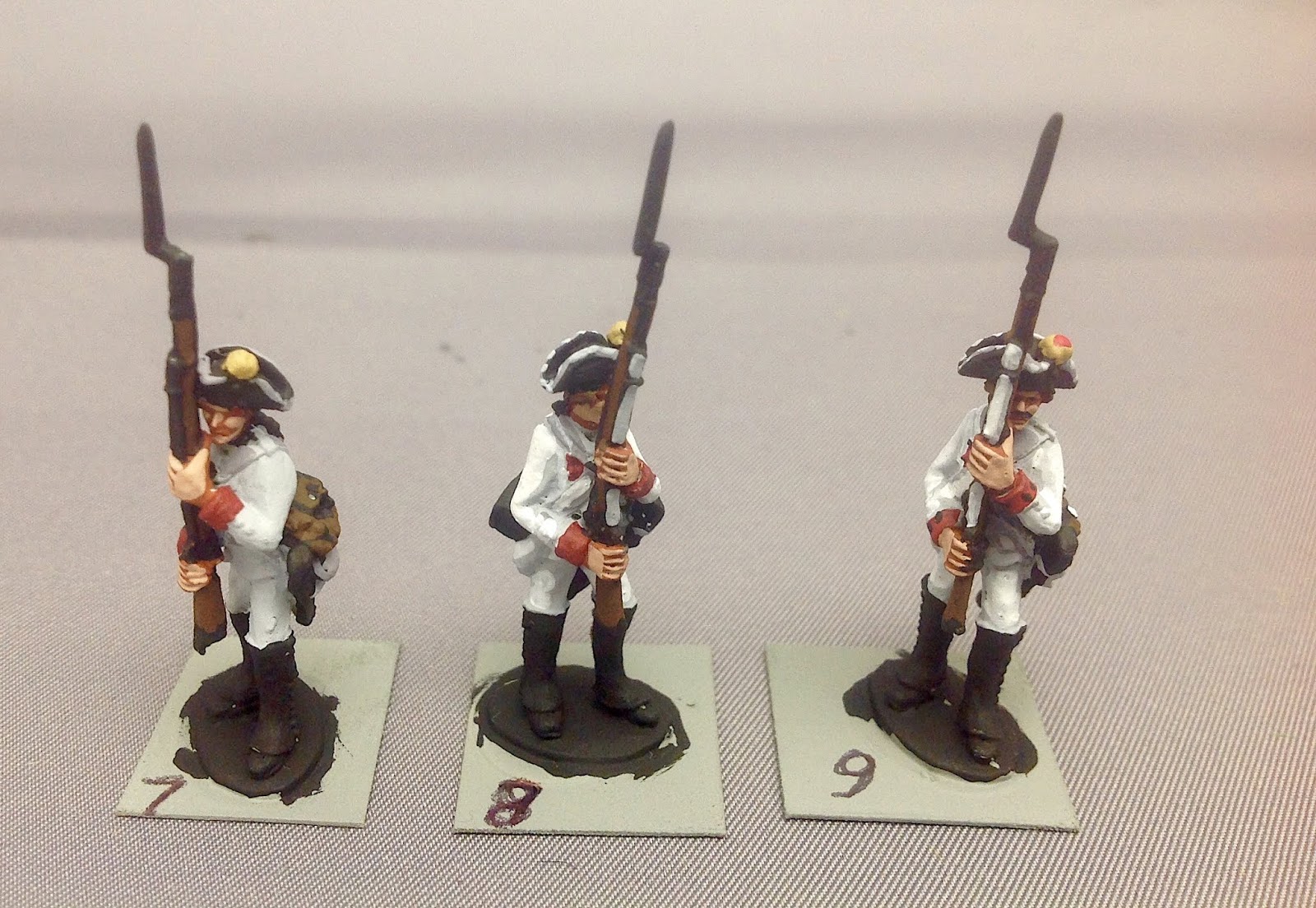
Yesterday I finished 22 figures - Minden Miniatures SYW Prussian Guards in tricorn hats (hence the 2nd battalion of the IR15 Guard Regiment). There was a point during the afternoon painting session where I could really feel the painting mojo coming back. The paint was flying off of my brushes.

Close up view of the figures painted so far.

The figures are being painted as part of a painting challenge, set up by Major General Pettygree, for the month of January. I have to finish the total 32-figure unit by the end of this month. Participating in a painting challenge is a good way to get back into the painting groove.

I had a spare Prussian Zimmerman on hand, already primed, so I painted him as one of the Guards and will place him on the command stand when I get around to basing all of the figures.

The Color Palette Used
Here is a list of the paint colors that I have used on my Prussian Guards. The first color shown is the shade color and the second color is usually my highlight color. Sometimes I will use a third color in a triad, so where three colors are listed, the first color is the shade, the second color is the base, and the third color is the highlight.


Flesh tones:  

Red Brown   IWM   77-713
Rosy Shade  Reaper  09067
Rosy Skin    Reaper  09068

Yellow Breeches and Waistcoat:

Rucksack Tan  P3 Paint   93062
Moldy Ochre   P3            93063


Blue Coat:

Breonne Blue    Reaper    09055
True Blue          IWM      77-720


Red Facings:

Blood Red        Reaper      09003
Fire Red           Reaper      09004
Phoenix Red     Reaper     09005

Black
I use various craft paints for the black and brown bits. Any item of equipment (gaitors, musket, hair, rucksack, etc) gets an undercoat of black paint. Then I paint the brown color over the black. I sometimes highlight brown colors, but recently I have decided that the musket barrel and fur pack look better without the highlights.  I generally do not do highlights for black paint.

And it goes without saying that EVERY METALLIC COLOR should have a black undercoat or else the metal doesn't pop visually. For example, when you paint a button, paint it black first, and then dot the gold or silver or brass color on top of the black button.

Whites and Greys

I use craft paints for most of my grey tones and any pure white will look good. I use one of the P3 white colors. For cross belts, use a light grey undercoat and then apply the white paint over the grey. White on top of a darker grey doesn't look very good because the color contrast is too great.

If I want a dirty white color, such as for haversacks and waistcoats/breeches, I use a mid tone of grey as the base and then use the light grey as the highlight color.

Shading and Highlighting

I use a two-color shade & Highlight system for most of my colors (uniforms and brown equipment). Sometimes I will go with the now-traditional shade/base color/highlight triad system, but in my experience, add the third color doesn't give you much of a payback in the look of the finished figure.

Mixing Your Own Highlight Colors

Sometimes you just can't find a suitable second color or highlight for one of your colors. In this case, you will have to mix up your own paint forumula. Start with your base color, not the shade, and add in a lighter color for the highlight. I don't use white for everything though. I have found that a light tan is a good color to use for the highlight mixer. Regular white will turn your red into a pink and you don't want that to happen. Brown and orange make for a good looking brown highlight, as does the light tan. The red leather apron on the Prussian zimmerman figure was my own mix of the base red brown color with a small drop of light tan.


Thursday, October 25, 2018

Painting Tutorial: SYW Austrians


I was starting a new battalion of SYW Austrians so I thought that I would take a dozen figures aside and illustrate a step by step tutorial for how I paint Austrians. The Russian painting tutorial was well received so I hope that you will find this one useful too.

Twelve steps from primed figure (left) to finished musketeer (right)

Steps 1, 2 and 3
Steps 1 to 3: I start all of my painted figures with a coat of grey primer. I don't like how colors work with black primer and white primer oftentimes shows through for lighter colors such as red. Grey primer is a happy medium and works well for me.

I start the Austrian uniform with a coating of Ral Partha (or Iron Wind Miniatures - IWM paints, 77-707) "Light Grey" for my base coat (step 2). Next I apply a red brown color (IWM 77-713) for the flesh areas as the undercoats (step 3).


Steps 4, 5, and 6
Steps 4 through 6: The next step in the process (step 4) can be tediously time consuming and cause you to lose your will to live. However, it is probably the most important step in my painting procedure. I use a common craft paint black to black in the equipment on the figure. I apply black paint to the tricorn hat and the gaitors. I also apply black as an undercoat for all equipment items such as the musket and the fur pack. Remember how I don't like black primer? Well in this case, equipment items look much better underneath brown, which I use in step 6 for the musket stock, hair and fur pack.

Step 5 is the application of the red facing color on the cuffs and lapels. I use Reaper Pro Paints "Blood Red" (19002) for my basic red color on all of my figures. Through step 6, the figure still looks rather rough, but now that all of the base colors have been blocked in on the figure, the pace will pick up considerably from here on and make the painting of the figure fun and relaxing for me.

Step 6 is the application of all of the brown color (Reaper Master Series #09109) onto the musket stock, the hair and the fur pack.


Now the figures are starting to look like Austrian musketeers -
the transition from Step 7 through completion in Step 12
Steps 7 though 9: Now on step 7, I use some regular grey, mid-tone color for the hat lace and all of the cross belts. The grey is a common craft paint color. I also block in the dark yellow (P3 Rucksack Tan 93062) on the hat pom.

Step 8 is when we start to work on the final white uniform color of the Austrian coat. The white (P3 Morrow White 93073) is thinned down a little bit with a small drop of water to make the color flow that gives the coat color a consistent look. When I use the white paint straight out of the bottle I find that I sometimes get globs of pigment sticking to the figure in an uneven coat. Thinning down the white fixes this problem. I use white straight from the bottle for all of the cross belts because the thinning method doesn't work very well for smaller areas on the figure. I finish off the hat lace by using IWM Light Grey again - this time making small hash marks along the rim of the hat lace so that the darker grey underneath gives the lace some definition.

Step 9 is the application of red highlight color to the base red. I use Reaper Master Series Paint "Fire Red" #09004 for the highlight which helps to make the red "pop"!

Steps 7, 8 and 9.
 Steps 10 through 12 - finishing the figure

Step 10 is another one of my least favorite steps, the application of the metallic musket barrel and bayonet. I have yet to find a color that I really like, but for these models I used Reaper Master Series "Aged Pewter" #09196.

Step 11 is the application of brass (Valejo "Old Gold" #70.878) to butt of the musket, the buttons on the coat and the gaitor buttons, the hanger sword, the scabbard tip and any buckles that might appear on the figure. The gaitor buttons can be a bit of a pain to paint, but the Minden figures have raised buttons that are easy to paint by simply running the edge of your brush along the row of buttons.

Step 12 is when we add flesh highlights (Reaper Master Series "Dark Rose Skin" #09067), just dabbing a single dot on the tip of the nose, on the chin and on each cheek. I apply a couple of lines across the wrist of the figure. I don't paint knuckles, but some people like to do so. I also paint in the eyes by making a pin prick of white paint on each end of the eye socket, which I have previously painted black on Step 9. The final step is to paint the base of the figure dark green. Sometimes I will add some wood grain to the musket stock using Reaper Master Series "Oiled Leather" #09110 and use the same color as a highlight for the hair and fur pack.

Getting to the finish line: Steps 10, 11 and finally, 12.
In recent times I have stopped adding highlights to the muskets and fur packs on the theory that you can't discern the difference from afar. Also, I only use 2 colors rather than the triad paint system. One less color saves me a lot a time.

Steps 4 through 12 shows the progression of the painting after the initial base coats are painted.

I hope that you enjoyed this tutorial and that it will help you with some of your own painting projects. At a future date I will do a Prussian tutorial.